



Artificial intelligence is changing how digital products are designed and experienced. From generative AI assistants to AI-powered tools, companies are quickly integrating AI into products and workflows to improve speed, efficiency, and decision-making.
This shift is not only about technology. It is changing how people interact with digital systems.
AI UX is the practice of designing user experiences for AI-powered systems where outputs are dynamic, probabilistic, and context-dependent rather than fixed or rule-based. It focuses on how users understand, trust, and work with systems that generate and adapt responses in real time.
Unlike traditional UX design, where interactions are predictable and linear, AI introduces variability, adaptive interfaces, and non-linear workflows. Instead of designing fixed journeys, designers now design systems that evolve based on input and context.
This is where many AI products fail. Without strong UX thinking, even powerful AI can feel unclear, inconsistent, or hard to trust.
In this article, we will look at why AI UX is different from traditional UX design and what teams should focus on when building AI-powered experiences.
Traditional UX vs AI UX: What сhanges?
Traditional UX design is built around predictable systems and fixed workflows. Users take an action and expect a consistent outcome every time.
AI changes that experience completely.
AI-powered products introduce uncertainty, adaptive behavior, and generated outputs. Instead of designing static interfaces, UX professionals now design systems that learn, respond, and evolve based on context, data, and user input.
Here are some of the biggest differences between traditional UX and AI UX design:
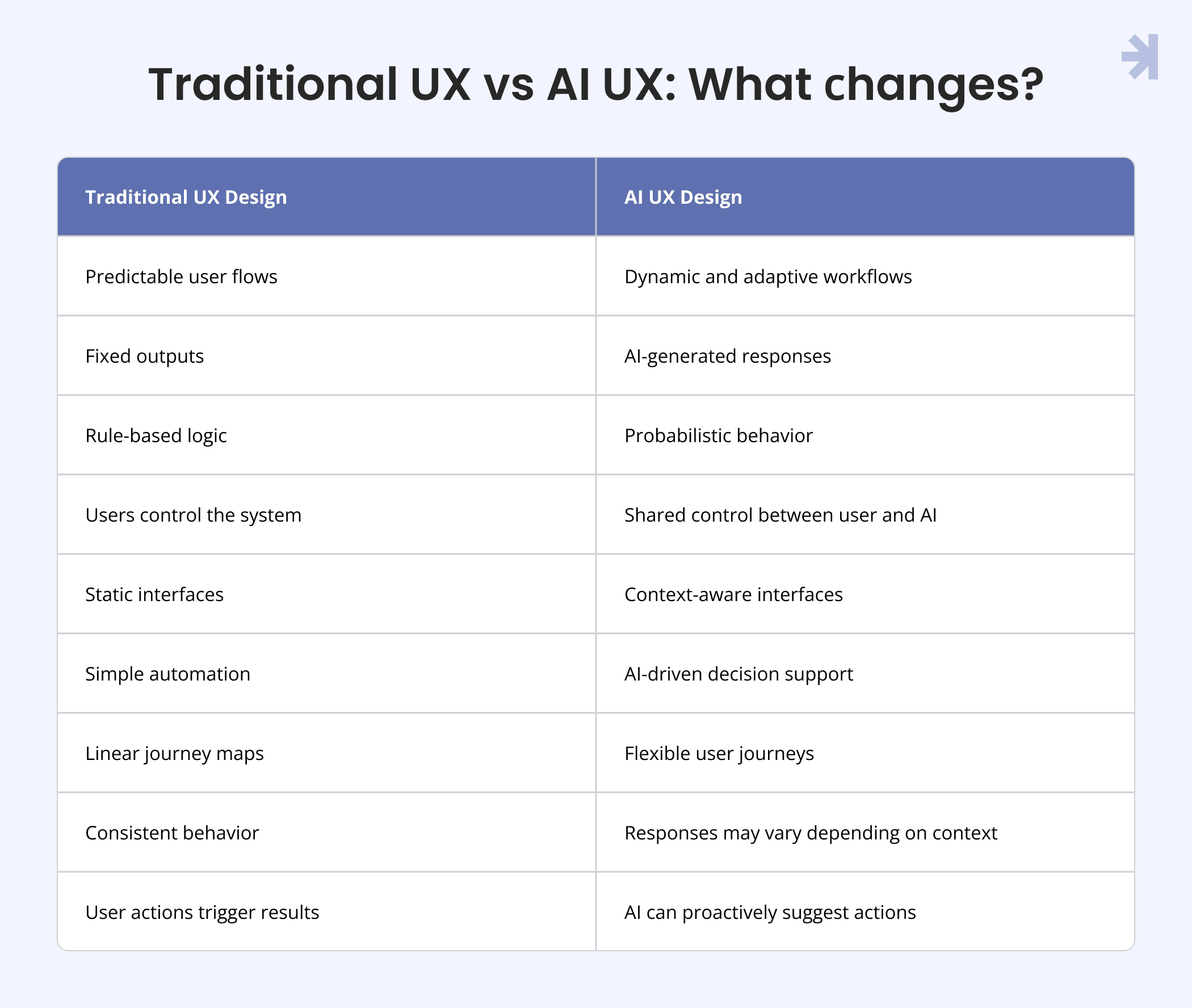
What this means for designers
This shift is not just a comparison between old and new UX models. It changes how designers think about systems, not screens.
In traditional UX, the focus is on controlling the user journey. In AI UX, the focus shifts to designing systems that behave consistently even when outputs are not fixed.
This means designers need to move from designing linear flows to designing interaction spaces where multiple outcomes are possible but still understandable.
Instead of optimizing for predictability, the goal becomes clarity in uncertainty. Users don’t always need the same result, but they always need to understand what is happening and why.
For designers, this introduces a few important shifts:
- from static screens to dynamic systems
- from fixed outputs to variable outcomes
- from linear journeys to adaptive workflows
- from UI control to system behavior design
In other words, AI UX is less about designing interfaces and more about designing conditions where interaction remains clear, even when results are not deterministic.
Artificial Intelligence changes the design process
AI is transforming how designers approach UX workflows, research, and product development. Today, teams use AI tools to save time, generate ideas, make wireframes, and improve design workflows. But AI for UX design is not only about speed.
It changes how product designers think about the entire design process.
With generative AI, designers can quickly create prototypes, explore multiple UX directions, and test concepts faster than before. This gives new opportunities for designers, developers, and product teams.
AI can:
- speed up research and design workflows
- support faster prototype creation
- enhance UX workflows with real data
- automate tasks
- generate ideas and wireframes
- improve collaboration between teams
- help designers focus on more valuable work
But AI tools still require human creativity, UX skills, and hands-on practice.
Good AI design depends on effective prompts, meaningful user feedback, and a strong understanding of users, context, and workflows. Without that depth, AI can quickly become generic or inefficient. This is why user testing remains critical.
Even advanced AI tools cannot replace real feedback, research, or thoughtful UX decisions. The best teams use AI to enhance the design process, not replace human thinking.
The future of UX is not designers versus AI. It is designers learning how to use AI more effectively to create better products, solve problems faster, and support users in more meaningful ways.
Read more in our article "UI/UX design for AI products: Making smart technology human-friendly"
Trust, control, and dynamic behavior in AI UX
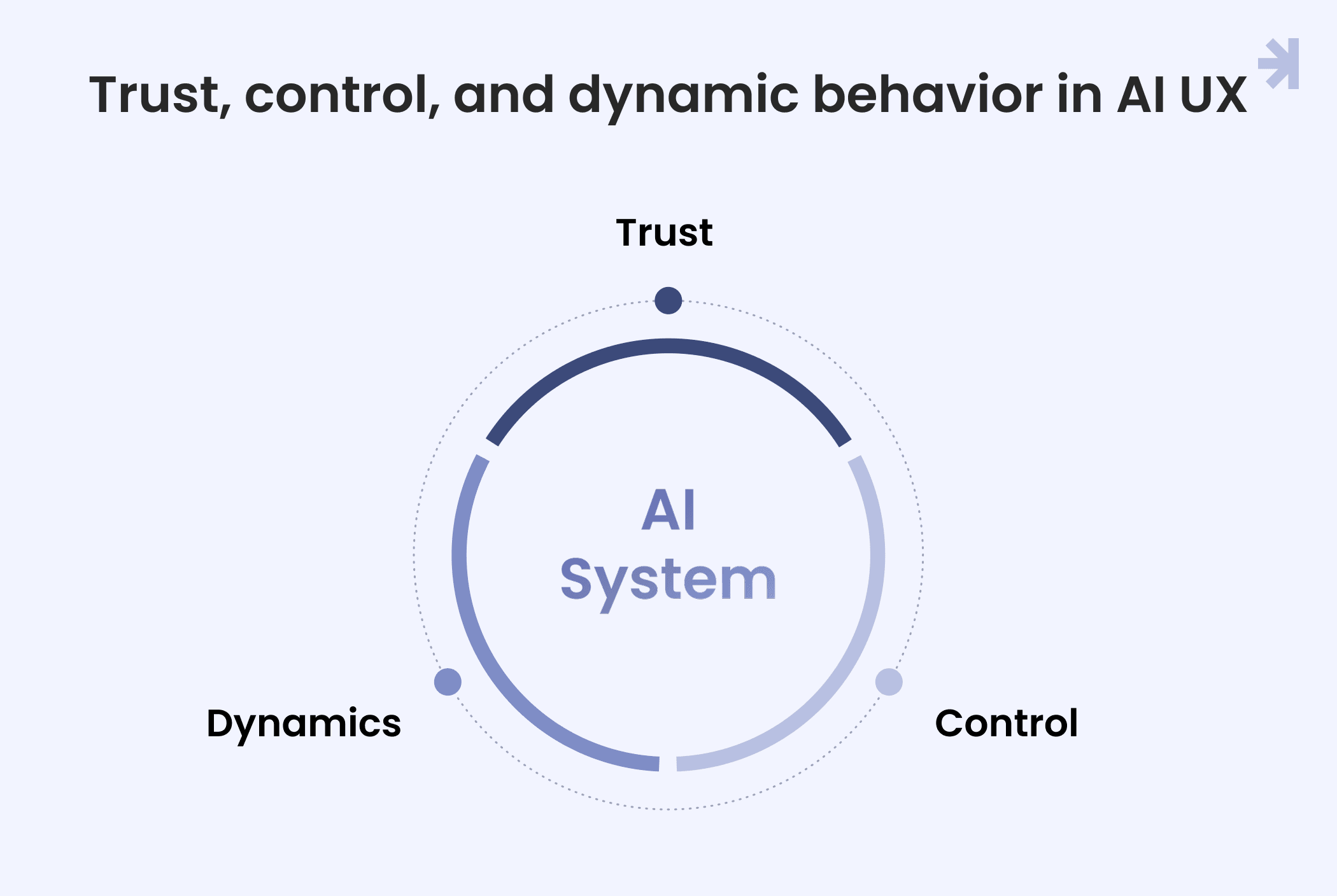
AI UX is shaped by three core layers: trust, shared control, and system adaptability. Together, they define how users understand, interact with, and rely on AI-powered products.
Trust becomes a UX system requirement
In AI products, trust is not a secondary layer. It is a core part of the interface.
Unlike traditional software, where users quickly learn predictable behavior, AI systems can produce different outputs for similar inputs. This makes users more sensitive to uncertainty.
Because of this, UX must make system behavior visible.
Users need clarity around:
- what influenced the output
- how confident the system is
- whether results can be modified
- where human validation is required
Without this clarity, even technically accurate AI systems feel unreliable. Good AI UX reduces uncertainty not by limiting capability, but by making system behavior understandable.
Designing for human–AI collaboration
AI should not replace user decision-making. It should support it.
The strongest AI products are built around collaboration, not automation. They help users complete tasks faster while keeping control in human hands.
Instead of fully automated flows, AI UX often includes:
- suggestions that users can accept or reject
- editable generated outputs
- step-by-step refinement loops
- confirmation points before final actions
This creates a shared workflow between user and system. The goal is not to remove effort completely. The goal is to reduce unnecessary effort while preserving control and understanding.
AI interfaces are dynamic by nature
Traditional interfaces are designed as fixed layouts with predictable states.
AI interfaces behave differently. They can change structure, content, and flow based on user input and context.
This means UX design must account for:
- variable output formats
- non-linear user journeys
- real-time system adaptation
- multiple possible states for the same interaction
Instead of designing one fixed path, designers must design a range of possible outcomes that still feel coherent and usable.
This requires stronger focus on:
- system consistency rules
- output structure constraints
- adaptive UI behavior patterns
The interface is no longer static. It is responsive in a deeper sense. It reacts to meaning, not just input.
AI design in healthcare and enterprise environments
AI UX becomes even more important in healthcare and enterprise products, where users work with complex workflows, sensitive information, and high-stakes decisions every day.
In these environments, poor UX does not just create frustration. It can slow teams down, increase cognitive load, and lead to costly mistakes.
That is why AI-powered products in healthcare and enterprise settings need much more than visually polished interfaces. They need workflows that feel clear, trustworthy, and easy to navigate under pressure.
For example, AI can help:
- generate patient summaries
- surface important insights from large datasets
- support decision-making
- automate repetitive administrative tasks
- reduce time spent searching through information
But users still need visibility and control.
Doctors, analysts, and enterprise teams need to understand what the AI is doing, where information comes from, and when human validation is required. The UX should support fast decision-making without hiding important context.
This is where thoughtful AI UX design makes a real difference.
The best AI systems do not overwhelm users with complexity. They simplify workflows, reduce friction, and help people focus on the decisions that matter most.
Read more in our article "How AI is changing healthcare UX design"
Common mistakes companies make in AI UX
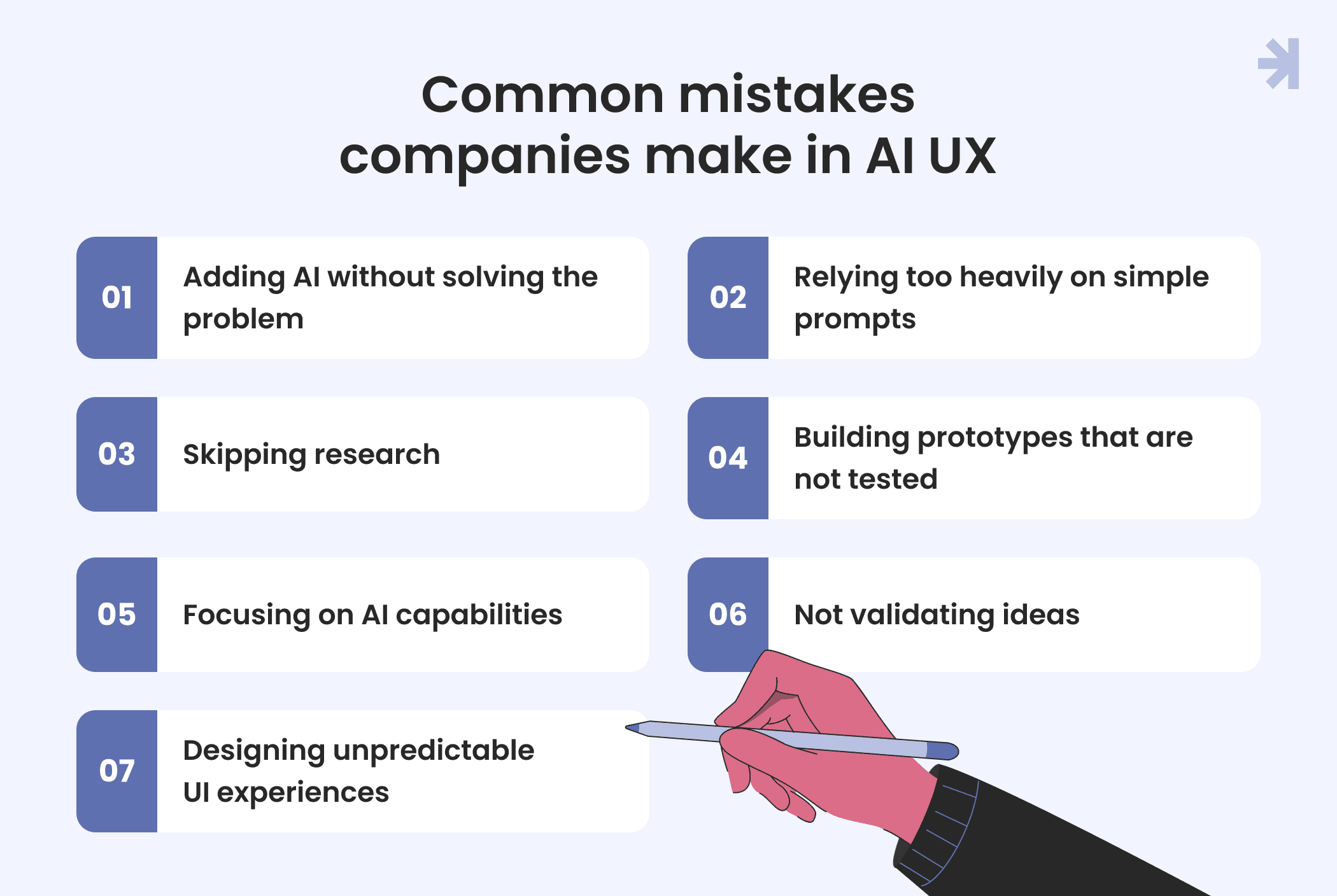
Many companies rush to add AI into their products, but without thoughtful AI design, the experience often becomes more confusing instead of more useful.
Some of the most common mistakes include:
- adding AI without solving a real user problem
- relying too heavily on simple prompts without proper UX thinking
- skipping research before launching AI features
- building prototypes that are never tested with real users
- focusing on AI capabilities instead of practical workflows
- generating ideas quickly, but without validating them
- designing UI experiences that feel unpredictable
One of the biggest mistakes is treating AI like a feature instead of a complete design challenge.
Good AI UX requires research, testing, iteration, and a deep understanding of how people actually interact with systems. The goal is not just to add AI into a product. It is to create meaningful change through experiences that feel clear, useful, and trustworthy.
What great AI user experience looks like
Great AI UX is not about adding complexity. It is about transforming how people interact with UI so the experience feels clearer, faster, and more useful.
Instead of overwhelming users with options, strong AI design turns ideas into simple, actionable flows. The UI supports thinking, reduces friction, and helps users move from input to outcome with less effort.
In well-designed AI products, users don’t struggle to understand what to do next. The interface guides them naturally, whether they are exploring ideas, refining outputs, or creating something new.
Good AI UX transforms:
- how ideas are captured
- how they are shaped into actions
- how users interact with UI
- how quickly outcomes are achieved
The result is not just a better interface. It is a better way of working with technology, where AI feels like a natural extension of the design experience rather than a separate layer on top of it.
Build your AI product with MagicFlux
AI is not just changing tools. It is changing how we think about design itself.
For teams building AI-powered products, the challenge is not whether to use AI, but how to integrate it in a way that actually improves the user experience.
That is where we come in.
At MagicFlux, we help companies design AI products that are clear, usable, and human-centered from early ideas to scalable design systems.
If you’re building with AI, we can help you turn complexity into a product people actually understand and use.

Can AI improve accessibility in UX design?
Yes. AI tools can automatically check color contrast ratios, suggest accessibility improvements in UI, generate alt-text for images, detect non-inclusive language. This helps designers build more accessible and inclusive experiences with less manual effort.
How does generative AI help in UX design workflows?
Generative AI allows designers to turn simple text prompts into high-fidelity mockups and prototypes. This helps teams explore multiple design directions quickly, test ideas faster, and accelerate early-stage UX exploration without slowing down the design workflow.
Where is AI most useful in UX workflows?
AI is most effective in the early and analytical stages of UX work, including research analysis, ideation and concept generation, prototyping, usability testing support. It improves speed and efficiency, but does not replace strategic UX thinking.
How is AI changing the role of UX professionals?
AI is expanding what UX professionals can do, making generalists more valuable than ever. Instead of focusing only on execution, UX designers now need to think more about strategy, storytelling, outcomes, and data-driven judgment. AI handles execution speed, but humans still define direction, meaning, and product decisions.