


A patient books a follow-up appointment in your app. The next morning, an SMS asks them to confirm. They reply, "Yes". Nobody reads it because the number is no-reply. Two days later, the patient portal still shows the visit as unconfirmed and sends an email reminder. The patient calls the clinic to ask if the visit is still on.
Every channel did its job. The conversation still broke.
This happens in healthcare products that grew one channel at a time, as new technologies came along. And it touches more people every year, because the shift to digital health access is already here. In 2022, 33% of people aged 16 to 74 in the EU used the internet to make an appointment with a practitioner, and 24% accessed their personal health records online, according to Eurostat statistics on internet use in 2022.
For healthcare providers and organizations, more digital channels should mean improved access and better patient engagement. In reality, disconnected notifications create confusion, extra calls to the front desk, and a patient experience that feels careless. That is the opposite of what builds trust.
The focus of this article is patient communication from the patient's perspective. It shows how to design it as one conversation across SMS, app, patient portals, and email. You'll get a model for giving each channel a clear job, rules for routing by type and urgency, consent patterns people actually understand, and practical tips and strategies for keeping the thread when someone switches channels.
Key takeaways
- Patients don't experience channels. They experience one conversation with their care provider, so design the conversation first and the channels second.
- Give every channel a clear job: SMS for time-sensitive nudges, the app for in-flow actions, the patient portal for depth and health record access, and email for summaries.
- Keep sensitive details in secure, logged-in channels, and use SMS, push, and email to guide patients there.
- Treat consent as part of the experience: it decides which channel each message can use, so people need plain, granular choices they can see and change.
- Continuity depends on shared message history and status sync, so a task finished in one channel disappears from every other one.
What is multi-channel patient communication?
Multi-channel patient communication is how a healthcare product reaches people across SMS, app, patient portal, email, and phone. Done well, those channels behave like one conversation, not separate broadcasts. Done badly, each channel talks to the patient as if the others don't exist.
Most healthcare providers already use several channels. Visits are confirmed by SMS. Lab results appear online. Medication reminders arrive as push notifications. Invoices come by email. The question isn't whether to use more channels. It's whether the channels you have connect into something a patient can follow. That makes communication management a design subject, not only a technology choice. Often, the most innovative ways to improve patient engagement come from connecting the channels you already have, not adding new ones.
Multichannel vs omnichannel patient communication
The two terms are often used as if they mean the same thing. They don't.
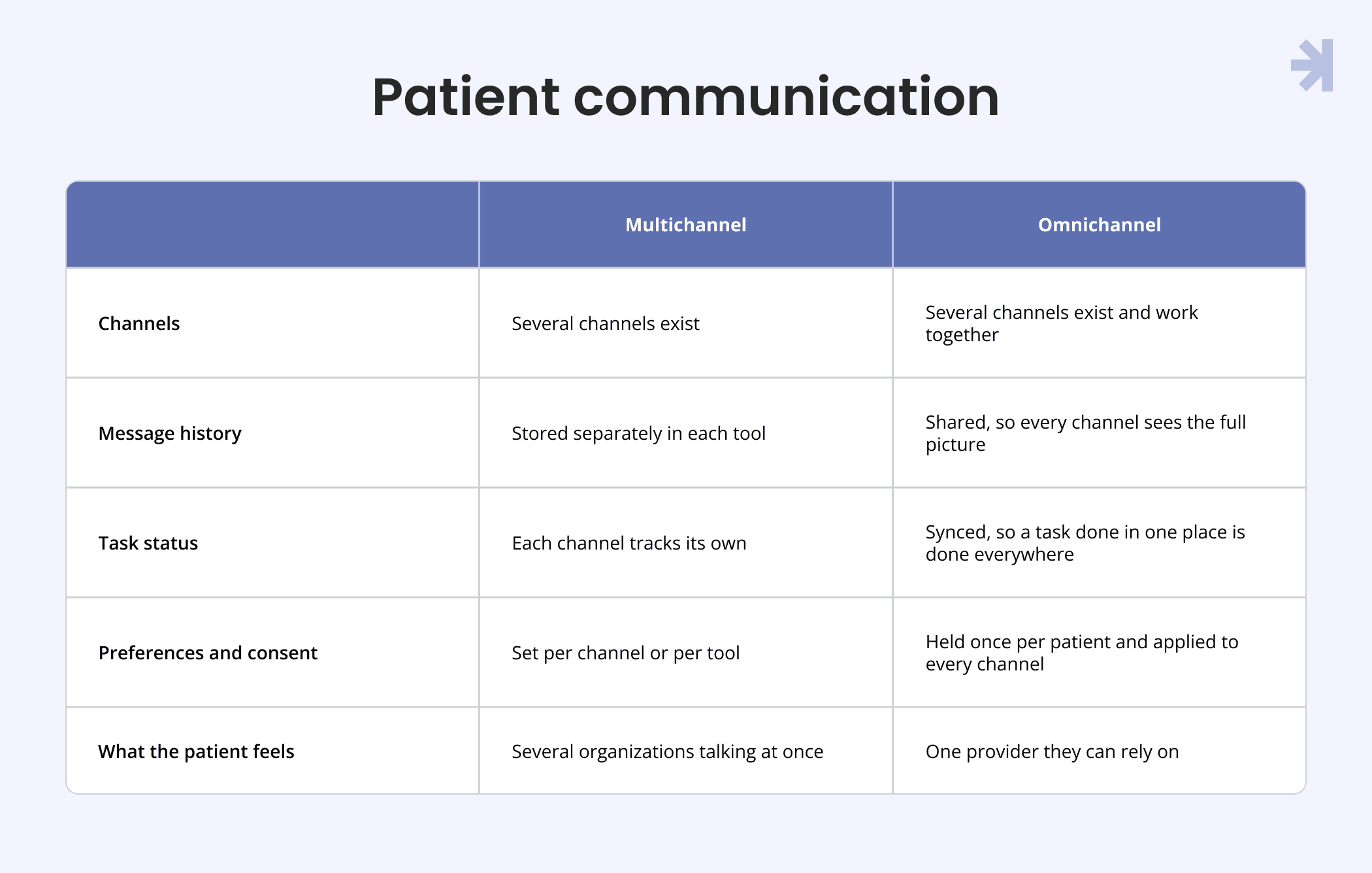
Multichannel is about access. Omnichannel is about continuity. The shift from one to the other is where patient engagement improves, because from the patient's perspective there is only one provider and one conversation.
What "the thread" means
The thread is the single, continuous conversation between a patient and their care provider about one episode of care. It holds one message history that is visible on every channel, tracks what the patient has already done, and has one clear place where the conversation continues when the patient replies.
When the thread holds, a patient can start a task in an SMS, finish it in the app, and see it marked as done on the web. When it breaks, they get reminders for things they already did and replies that go nowhere. The rest of this article is about keeping it intact.
Why does patient communication lose the thread across channels?
Patient communication loses the thread because channels are usually added one at a time, by different teams and vendors, without a shared model of the conversation. Each channel ends up acting as if it is the first contact. Patients are the only users who see the whole picture, and it rarely makes sense.
Channels added one at a time
Most healthcare products don't plan their channels. They collect them. An SMS tool comes first for appointment reminders. The patient portal arrives with the health record system. A mobile app follows. Telehealth services add their own notifications on top. Meanwhile, patient expectations keep evolving, and each new expectation brings another tool.
Each addition solves a real problem. But each one also adds complexity: its own service logic for when to send, what to say, and who to send it to. Take appointment reminders. The SMS tool sends one 48 hours before. The app sends a push notification 24 hours before. The portal sends an email the morning of the visit. Nobody designed that sequence. It just happened, and the patient gets three reminders about one visit.
No shared message history between channels
When channels don't share history, every channel starts from zero. It doesn't know what the patient already saw, read, or completed.
Intake forms show this clearly. A patient completes the form in the app on Monday. On Tuesday, an SMS reminds them to complete it. On Wednesday, the online account shows it as outstanding. The patient starts to wonder if their answers were saved at all. Some fill it in again. Others call the clinic. Both outcomes add work for doctors and front desk staff and erode the patient's confidence in the product.
Consent and preferences stored per tool, not per patient
When consent lives inside each tool, a patient's choices don't follow them. They might turn off SMS in their web account settings and still get texts, because the SMS tool never received that change.
Lab result notifications are a common example. A patient asks to be told about new results by email only. The web account respects that. The app, which has its own notification settings, sends a push notification anyway. To the patient, it looks like their choice was ignored. In healthcare, an ignored preference quickly turns into concerns about data security and who is in control of their information. That trust is hard to win back.
Replies with nowhere to go
People treat every message as the start of a conversation. Many tools treat it as a broadcast.
Billing reminders often fall into this gap. A patient gets an SMS about an unpaid invoice and replies with a question about the amount. The number is no-reply, or the reply lands in an inbox nobody in finance checks. The patient hears nothing, the invoice stays unpaid, and the next reminder feels like pressure rather than help.
Every unanswered reply has a cost. It shows up as repeat calls, duplicate support tickets, and missed payments. Individually, each one looks small. These costs rarely show up in statistics, but service and finance teams feel them every day. Together, they add to the total cost of running patient communication and lower the efficiency of the teams behind it. A connected setup is simply more efficient to run.
What role should each channel play in patient communication?
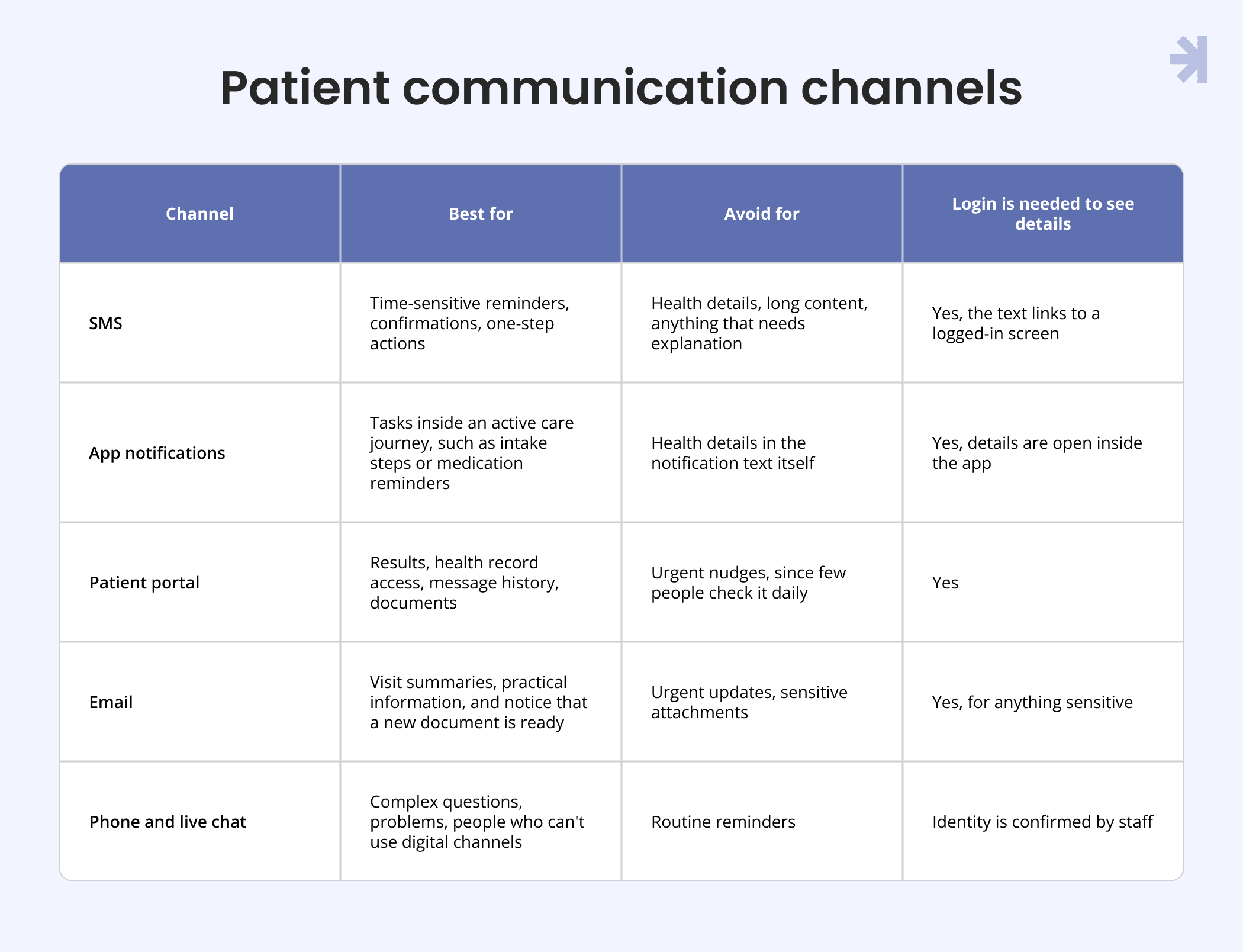
Each channel works best for a specific kind of message. The whole setup works when every channel has a clear job, instead of repeating the same content everywhere.
One rule sits above all the others. Sensitive content lives in secure, authenticated channels, meaning the app and patient portals, where the patient has logged in. SMS, push notifications, and email notify the patient and guide them there. They don't carry the details themselves. This one rule lowers risk and gives people more control over who sees their health information.
SMS for time-sensitive nudges
SMS is the channel people are most likely to see quickly. It works on any device, needs no app, and doesn't depend on the patient remembering a password. That convenience makes it the right choice for anything with a deadline: a visit tomorrow, a form due beforehand, or a reminder to join a video call. It also means improved access for patients who don't use apps or rarely log in.
It's also the least private channel. Texts appear on lock screens, shared phones, and family devices. Standard SMS isn't end-to-end encrypted either. So keep SMS short and neutral, for example, "You have a new message from your clinic" with a link, and let the patient read the details after logging in. If your team is comparing messaging technologies, ask your engineering and security partners which channels offer end-to-end encryption and what that means for the data you send.
App notifications for in-flow actions
The app is where patients act. Push and in-app notifications work best when they point to one specific task: the next intake step, a medication reminder, or a check-in before a telehealth visit.
Good app notifications are rare and relevant. If the app sends the same reminder the SMS already sent, users learn to ignore both. Make each notification open the exact screen for the task, not the home screen. That smooth transition from notification to action is what keeps people moving.
Patient portal for depth, records, and history
The patient portal is the reference point. It holds the full health record view, results, documents, care resources, and the complete message history across every channel. When someone wants to check what was said or find something later, this is where they go.
Patient portals are poor at urgency. Few people log in without a reason. So it shouldn't be the only place an important update appears. It should be the place every other channel points to.
Email for summaries and documents
Email suits content people may want to keep or reread: a visit summary with practical guidance on next steps, preparation instructions, and notice that an invoice or document is ready. It can also link to resources on the clinic's website, such as directions or opening hours, and it gives patients a searchable record in a tool they already use.
Email is slow for anything time-sensitive, and many people rarely check it. Like SMS, it should notify and link to secure channels for anything sensitive, rather than attaching it.
Phone and live chat for escalation
Phone and live chat are where the product hands over to people. They help patients with complex questions, patients who are stuck, and patients who can't or don't want to use digital channels. This is where human expertise adds the most value, because some things are easier to discuss than to type. When a patient is worried or confused, a human connection often resolves in minutes what notifications couldn't.
Escalation only works if the person on the other end can see the thread. When front desk staff, physicians, or clinicians see the same message history the patient sees, they can give an informed answer, and the patient doesn't have to explain everything again. These conversations also give product teams insights into where digital channels fall short. The design question isn't only "how do patients reach a person?" It is also "what does that person know when they answer?"
How should a healthcare product route and prioritize patient messages?
Design the message hierarchy before the screens. Classify every message by type and urgency, then decide which channels each class may use and what happens if a channel fails. Once those rules exist, every new feature, vendor, or notification fits into a clear structure instead of adding to the noise. This is the core of message management and one of the most practical strategies a product team can adopt.
Message types and urgency levels
Most patient communication falls into five types. Each one carries a different level of urgency and a different tolerance for being missed.
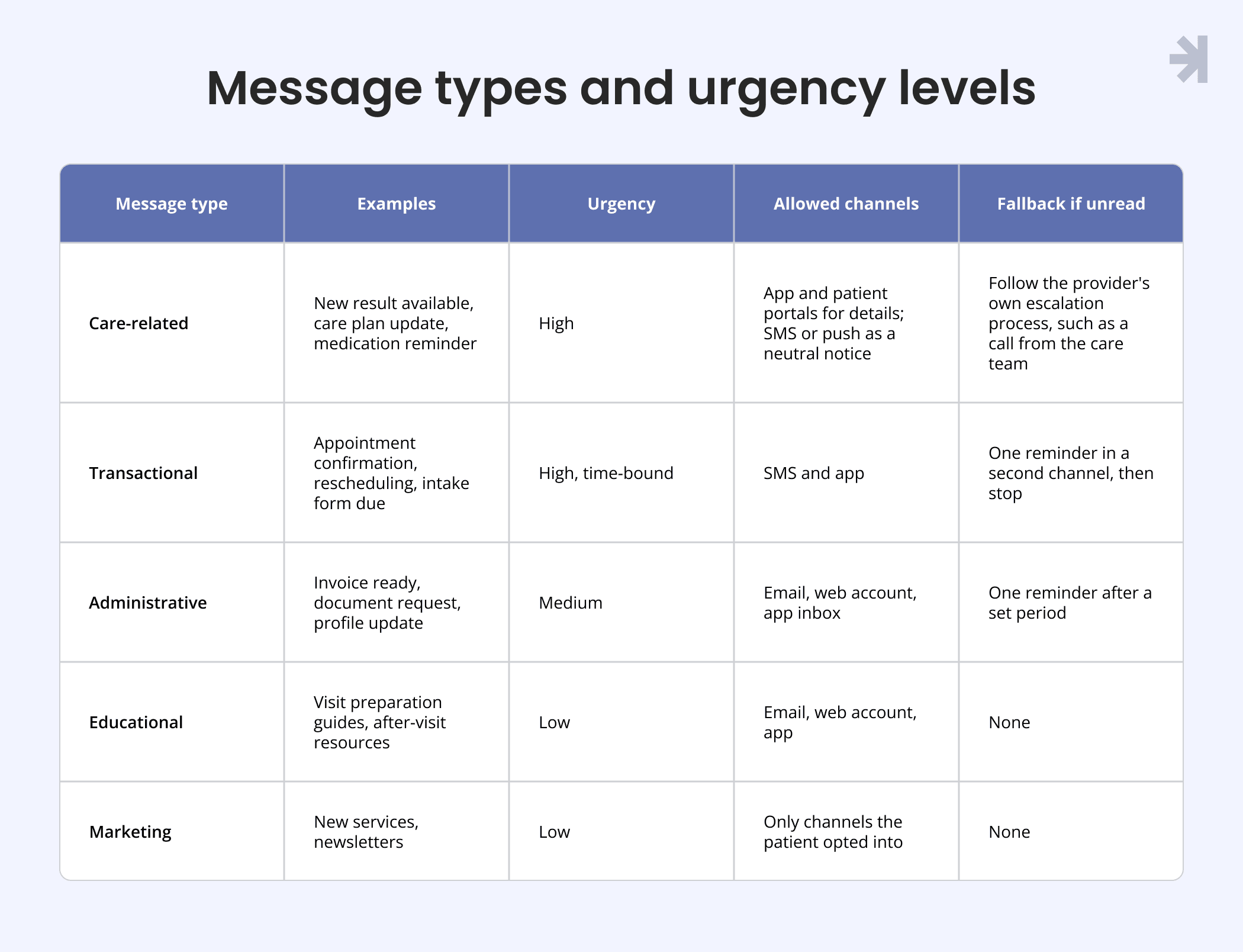
The table is a starting point, not a rule set to copy. What counts as urgent for care-related updates is a decision for the provider's clinical team, including the doctors and nurses who know their patients. From a design perspective, the job is to make sure the product can carry out that decision reliably, in the right channel, at the right time.
Fallback rules when a message goes unread
A fallback rule answers one question: if the patient hasn't seen this, what happens next? Without it, important updates sit unread in an inbox while the product assumes the job is done.
Good fallback rules are specific. "If the intake form isn't opened within 24 hours, send one SMS. If it's still not started 24 hours before the visit, flag it for the front desk." Each step has a trigger, a channel, and an end point. The end point matters as much as the trigger. A fallback that never stops turns into spam.
Fallbacks also need to know what "read" means. An email that was delivered isn't the same as a task that was completed. Base fallback triggers on the action the message asked for, not on delivery data alone. That focus on completed actions keeps the setup efficient and the volume low.
Deduplication and suppression across channels
Deduplication stops the same message from going out twice. Suppression cancels a planned message once it is no longer needed. Together, they are the simplest way to remove confusion from patient communication.
The rule is easy to state: when a patient acts in one channel, every pending message about that action is cancelled in all other channels. If they confirm a visit by SMS, the push notification and email reminder never go out. If they complete intake in the app, the web task disappears.
Implementation is harder because it needs one shared record of what was sent, where, and what the patient did next. That record is the real power behind routing and fallback rules. Without it, each channel has to guess, and complexity grows with every channel you add.
Quiet hours and frequency limits
Patients are people with jobs, families, and sleep. A reminder at 6 a.m. or five notifications in one afternoon doesn't feel like care. It feels like pressure, and it leads to notification fatigue.
Set quiet hours based on the patient's time zone, and let time-sensitive care-related updates follow the provider's own escalation process instead. Add frequency limits per patient, across all channels combined, not per channel. A patient who gets one SMS, one push, and one email in a day has received three notifications, even if each channel only sent one.
Frequency limits make sure the messages that matter still stand out. When patients know your product only contacts them when it's needed, they pay attention when it does. That makes it easier to manage engagement over the long term, and it supports the patient outcomes providers care about most, such as attended appointments and completed preparation.
How do you design patient consent that people actually understand?
Consent decides which channel each message may use. That makes it part of the communication design, not a settings page added at the end. When consent is designed well, patients feel in control, and the routing rules have reliable data to work with. When it isn't, every other part of the setup is built on guesses.
For products serving patients in Europe, consent also sits inside a wider context. The GDPR (General Data Protection Regulation) shapes how organizations handle personal and health data, and patient expectations around privacy keep evolving. What consent each message type legally requires is a subject for your legal team or data protection officer. The design question is how to make those decisions clear, usable, and easy for people to manage.
Granular choices by channel and message type
A single "Allow notifications" toggle doesn't reflect how people think. Someone may want appointment reminders by SMS, results notices in the app, invoices by email, and no marketing at all. One switch forces them to accept everything or lose updates they actually need.
Granular consent gives each patient a choice per channel and per message type. In practice, that is often a simple grid: message types down one side, channels across the top. Keep the number of types small and use the same names people see in the notifications themselves. If the grid needs an explanation, it has too many rows.
Some updates may not be optional, for example, essential information about an upcoming visit. Say so clearly, and explain why, rather than showing a toggle that does nothing.
Asking at the right moment in the journey
Bundled consent during sign-up, is consent people don't remember giving. Consent asked for at the right moment is consent they understand.
Use contextual permission requests. Offer SMS reminders when a patient books their first visit. Offer app notifications when they start a task that has next steps. Offer email summaries after their first appointment. Each request is short, connected to something the patient just did, and easy to accept or skip. Of all consent management strategies, this one is the simplest to apply across every channel.
This approach also gives people an informed choice. They see what each notification will be for before they agree to it, not after.
Making choices visible and easy to change
People change their minds. They change phone numbers, stop using the app, or decide they want fewer notifications. Changing a preference should take as few steps as giving it.
Show patients what they agreed to, in plain language, in one place. "You get appointment reminders by SMS and results notices in the app" is clearer than a list of toggles. Link to that page from every email footer and from the app and web settings. And make sure a change made in one place applies everywhere, immediately.
Visible, editable consent is one of the quietest ways a product builds trust. It shows people that their choices are respected, which matters even more in healthcare, where concerns about privacy and security are common. One of the most useful tips here: ask your support team for patient stories about unwanted notifications. They usually lead straight to a preference that one part of the product ignored.
Consent states as part of the design system
Consent isn't just on or off. A patient may have opted in, opted out, not been asked yet, or given consent that needs to be renewed. Each of these states affects what the product shows and sends.
Treat consent states as part of the design system. Define the states, the components that display them, and the copy that explains each one. Show state with text and icons, not color alone, so everyone can read it. When every team uses the same components and the same definitions, a preference set on the web looks and behaves the same in the app, and the risk of one channel ignoring it drops. It also prepares the product for the future: any channel added in the future inherits the same consent model instead of starting from scratch.
How do you keep the conversation continuous when patients switch channels?
Continuity depends on three things. Every message links to the exact task. Every reply reaches someone or gets a clear alternative. And status syncs, so a task done in one channel disappears from the others. Get these right, and people can move between SMS, app, portal, and email without losing their place.
Deep links to the exact task, not the home screen
A notification that opens the home screen asks the patient to find the task on their own. Many won't. A deep link takes them straight to the step they need to complete.
Take an intake reminder by SMS. The link should open the login screen, then go directly to the intake form, at the step where the patient left off. Not the dashboard. Not the start of the form. The same applies to medication management reminders, payment requests, and appointment confirmations. Each notification should guide patients to one action and make that action the first thing they see.
Deep links also need a fallback. If the patient opens the link on a device without the app installed, send them to a secure web version of the same task. The transition between channels should feel like one step, not a restart.
Handling patient replies to SMS and email
People reply to texts and emails. Design for it, or tell them clearly where to go instead.
There are three workable options. Route replies into a shared inbox that staff actually monitor. Accept a small set of keyword replies, such as "YES" to confirm or "CHANGE" to reschedule, and confirm what happened. Or make the text clearly no-reply and include a direct link to the app inbox. What doesn't work is a reply that disappears without an answer.
When replies are routed to staff, each reply should land in the same message history as everything else. That way, clinicians and support teams can connect it to the right visit, form, or invoice, and the patient's question doesn't get lost between systems.
One message history in the app and patient portal
The app and patient portal should show one message history that includes every channel. If an SMS went out, it appears in the history. If the patient replied by email, that reply appears too. This is the thread made visible.
A single history gives each patient a reliable place to check what they were told and when. It also gives doctors, physicians, and front desk staff the same view, which makes every conversation faster and more consistent. Many patient stories about confusing care start with someone asking, "Which one was the right message?" A shared history answers that question before it's asked.
Status sync across every channel
Status sync means that when something changes in one place, it changes everywhere. A confirmed visit stops all further reminders. A completed form disappears from every to-do list. A paid invoice ends every payment reminder.
This is where the connection between channels becomes real for the patient. It's also where most implementation effort goes, because it depends on systems sharing data about tasks, not just notifications. The payoff is worth it. Status sync removes the duplicate reminders people notice most, lowers support costs, and improves efficiency for every team involved. It's the quiet power behind a patient experience that feels connected.
How do you design for caregivers, shared devices, and patients who aren't on every channel?
Real patient communication includes people who manage care for someone else, share a phone, never install the app, or need a different language or accessible format. A channel model designed only for a single, digitally confident patient will fail all of them. The design needs a fallback for each.
Caregivers and proxy access
Many people don't manage their care alone. A parent handles a child's appointments. An adult child helps an older parent. A partner keeps track of medication during treatment.
Proxy access lets a caregiver receive updates and act on behalf of the patient without sharing a login. Design it as its own role, not as a copy of the patient's account. The caregiver should see whose care a notification is about, which message types they can access, and what they're allowed to do. The patient, where they're able to, should stay in control of what is shared and be able to change it.
Keep the thread intact here too. If a caregiver confirms a visit, the patient's reminders should stop as well. One person acting shouldn't trigger duplicate notifications for the other.
Shared phones and privacy on the lock screen
A notification is visible before anyone logs in. On a shared phone or a family tablet, that preview may be seen by someone the patient didn't choose to tell.
Keep previews neutral. "You have a new message from your clinic" protects privacy. A preview naming a department, result, or treatment doesn't. Give people the option to hide previews entirely, and make that setting easy to find. This is a small design choice that lowers risk and supports a sense of security without adding friction.
Patients without the app
Some people will never install your app. Some can't because of their device, storage, or comfort with technology. Their care shouldn't depend on it.
Make sure every important task can be completed without the app. SMS links can open a secure web version of the task. The patient portal can offer the same actions in a browser. Phone support can complete the task for anyone who needs help. The app should be the most convenient route, not the only one. That approach keeps access open to all users, not just the most digitally active ones.
Language and accessibility preferences that follow the patient
A patient who prefers another language, larger text size, or a screen reader has that need in every channel, not just one. Store language and accessibility preferences once, per patient, and apply them everywhere: SMS, app, web, email, and the information staff see before a call.
That means translated templates for every message type, not only for the app. It means plain language that works when read aloud by a screen reader. And it means web and app screens built to the same accessibility standard, so a patient moving between them doesn't lose support along the way. For an example of accessibility designed across a patient portal and mobile app, see our Carely case study.
Need patient communication that holds together across every channel?
Most teams don't need more channels. They need the ones they have to work as one conversation.
At MagicFlux, we design and build patient-facing apps and platforms where communication, consent, and continuity are part of the UI/UX process from the start, not patched after launch. That means mapping the full patient journey, defining the role of each channel, designing consent and preference flows people understand, and building the components that keep every channel consistent.
We've applied this approach in healthcare products like Luma, a patient-centered app covering scheduling, intake, communication, and follow-up. You can read how we designed the Luma patient journey.
If your patients are getting mixed messages, we can review your current channels, consent flows, and handoffs, show where the thread breaks, and help your team decide what to fix first. Talk to our healthcare UX team.
Final thoughts
Keeping the thread across SMS, app, portal, and consent doesn't require new technologies. It requires a few clear decisions, made before the screens are designed:
- Give every channel one job, and keep sensitive details behind login.
- Route each message by type and urgency, with fallbacks that know when to stop.
- Treat consent as part of the experience, held once per patient and applied everywhere.
- Link every notification to the exact task, give every reply somewhere to go, and sync status across channels.
- Design for caregivers, shared devices, and people who never install the app.
The expectation behind all of this is already set outside healthcare. In 2022, 72% of people aged 16 to 74 in the EU used instant messaging, according to Eurostat. People are used to conversations that remember what was said and continue where they left off. As patient expectations keep evolving, healthcare providers that offer the same continuity will stand out.
The future of patient engagement isn't more notifications or innovative ways to send them. It's one conversation that patients can follow from first message to last. That continuity is what builds trust, and it is where better patient outcomes start.
What is multi-channel patient communication?
Multi-channel patient communication is how a healthcare product reaches patients across SMS, app, patient portal, email, and phone. Designed well, those channels share history, status, and preferences, so they behave like one conversation instead of separate broadcasts.
What is the difference between multichannel and omnichannel patient communication?
Multichannel means a healthcare product uses several channels to reach patients. Omnichannel means those channels work together, sharing one message history, synced task status, and one set of patient preferences. The difference is continuity: with omnichannel communication, a patient can start a task in one channel and finish it in another without repeating anything.
Should sensitive health information be sent by SMS?
As a design practice, SMS works best as a neutral notice that links to a secure, logged-in channel such as the app or patient portal. Texts can appear on lock screens and shared phones, and standard SMS isn't end-to-end encrypted. What your organization may send by which channel is a question for your legal team or data protection officer.
How do you manage patient communication preferences across SMS, email, and app?
Store preferences once per patient, by channel and by message type, and apply them to every channel automatically. Ask for consent at the moment. It makes sense, for example, offering SMS reminders when a patient books an appointment. Show patients what they agreed to in plain language and let them change it in one step from any channel.
How do you prevent duplicate or conflicting messages to patients?
Keep one shared record of what was sent, in which channel, and what the patient did next. Use that record to cancel pending messages once a patient acts, for example, stopping all reminders after an appointment is confirmed. Add frequency limits across all channels combined, not per channel.